From VOD to clip in a minute
Paste a link. Spot the best moments at a glance. Drag them straight into your editor. Free, forever.
Free for Windows, macOS and Linux
Try it here with the transcribed VODs below. Search them, or play one. The app transcribes your own, and any line you find is a clip two keys later.
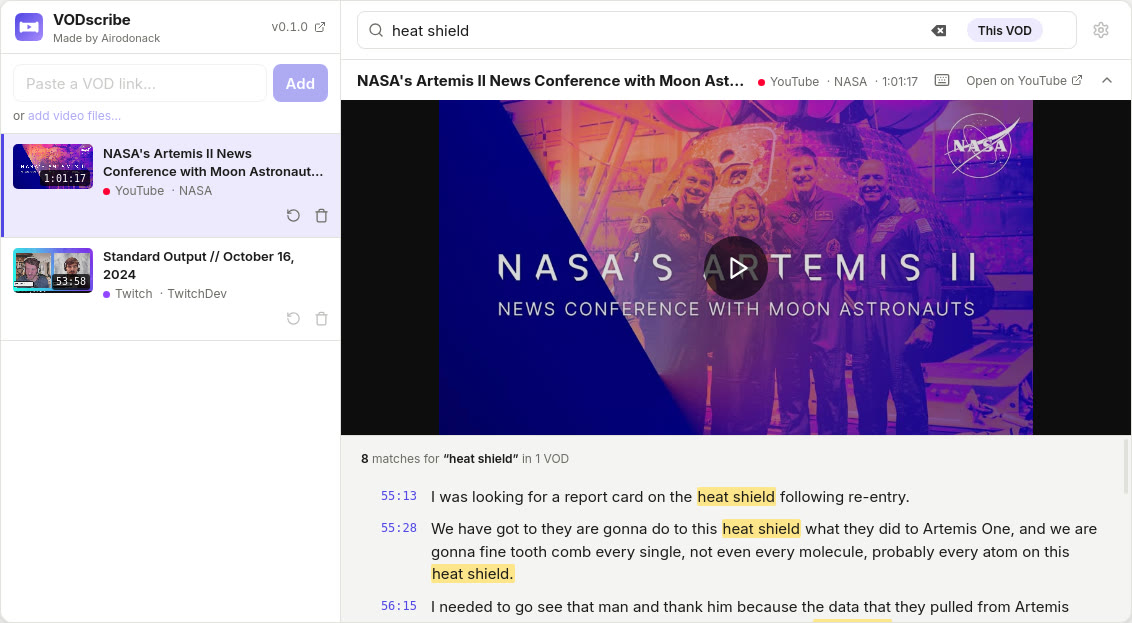
The live demo needs a bigger screen. Open this page on a computer to try it.
Clips straight into your editor
Mark a stretch on the timeline or pick lines in the transcript, then drag it into your editor or a folder. Several go out together, in order, and edits join pieces of one VOD or many.
Chapters and highlights
With a channel's VODscription, its VODs come with chapters, the moments chat reacted to and who was speaking, on the timeline and beside the transcript. About VODscriptions
Every word and chat message, searchable
Find every time a phrase was said or typed, across all your VODs, in the transcript and the chat replay beside it. A timeline shows where chat went wild.
Runs on your computer
No account, no uploads, nothing collected. Any recent computer will do, and an NVIDIA graphics card makes it several times faster.
Download VODscribe
- Windows 64-bit installer (.exe)
- Windows · MSI For managed installs (.msi)
- macOS · Apple Silicon M1 and later (.dmg)
- macOS · Intel Older Macs (.dmg)
- Linux · Debian and Ubuntu Package (.deb)
- Linux · Fedora and openSUSE Package (.rpm)
For 64-bit Windows 10 and 11, macOS 12 and later (Apple Silicon and Intel) and Linux. On first run it downloads what it needs to transcribe (about 1 GB) and checks each file.
Questions
Is it free?
Yes: no account, no ads, no trial. A channel pays for its VODscription, and everyone sees it for free. About VODscriptions
Do my VODs or transcripts get uploaded anywhere?
No. VODscribe downloads a VOD's audio and transcribes it on your computer, where transcripts and searches stay. It collects nothing about how you use it.
Which VODs can it transcribe?
Kick, Twitch and YouTube past broadcasts, highlights, clips and uploads, and video and audio files on your computer. Links from over a thousand other sites work too, from Rumble and Dailymotion to SoundCloud, their video kept on your computer to play.
Can I use the clips in my editor?
Yes. Drag a clip or a picked stretch out of the window into your editor or a folder, or use Show in folder on the clip. Clips are MP4 (H.264 and AAC), which nearly every editor reads; Settings › Encoding can make them MOV (DNxHR), which scrubs more smoothly and DaVinci Resolve needs on Linux.
Does it show the chat?
Yes, for Kick, Twitch and YouTube livestreams: the replay sits beside the transcript, in step with it, and search covers it too. A timeline shows how busy chat was and can mark the laughs, hype, subs and tips, or any words and emotes you choose.
Which languages does it understand?
English and 24 other European languages, with NVIDIA's Parakeet speech model. It's very good with clear speech, though names and game terms are sometimes misspelled.
How fast is it?
A recent processor transcribes an hour of VOD in minutes. On Windows and Linux, an NVIDIA graphics card with the free GPU add-on is several times faster.
Why does Windows or macOS warn me before opening it?
VODscribe isn't code-signed yet: signing needs a registered company, and I'm setting one up now. On Windows, choose More info, then Run anyway; on a Mac, drag it into Applications, open it, choose Done (not Move to Trash), then Open Anyway in System Settings › Privacy & Security and again when macOS asks, and enter your password. On macOS 14 or earlier, Control-click it in Applications and choose Open.
Something's broken, or I have an idea. Where do I say so?
Email problems to support@vodscribe.com, or post them on the issue tracker, where ideas go too. Get support
Can I see the code?
Yes. VODscribe is source-available under the Functional Source License: read it, build it, change it for yourself; just don't sell a competing product from it. Each version becomes Apache 2.0 two years after release. See the code on GitHub